- Support Added for Unicode Fonts in All Forms
Some forms in Bosch Solution Link were still formatted using Ansi character set resulting in missing text. All forms now use unicode fonts.
- Changed Text for Low Signal in Interactive
When the signal level was low for RF devices the text 'Relocate' would be displayed. This text has been changed to 'Low'. These changes apply to Interactive Keypads, Inputs and Outputs.
- Serial Number Truncation in Panel Forms Fix
Previously, only the first 6 digits of the serial number was displayed in the top bar of the panel forms. Now all 8 digits are displayed.
- Cannot Connnect to Internet Message Fix
An incorrect message was displayed if there was no internet connectivity. This has now been fixed.
- Zones RF Device ID Being Deleted Fix
If the RF Device ID is modified after uploading from a Bosch panel and the installer did not as yet save the changes, clicking on the RF Device ID would erase the Peripheral Type. This has now been fixed.
- New Door Option 'd' Added to Macros Scenes
The new option lowercase 'd' in macro scenes will unlock the door until next door event. Uppercase 'D' in macro scenes will unlock door for the period of the unlock time.
This option is available for Bosch Solution 6000 Rev 2.53.80 and Bosch Solution 6000-IP Rev 3.00.72.
Sample scene programming:
C120&d1 - When the Macro Rule is true the Scene will wait for 120 seconds (2m 0s); if the Macro Rule is still true operate Door 1 [Door 1 Name] until the next door event.
Sample scene programming:
C120&d1 - When the Macro Rule is true the Scene will wait for 120 seconds (2m 0s); if the Macro Rule is still true operate Door 1 [Door 1 Name] until the next door event.
- Support Added for New Keypads
Support added for the following keypads:
- CP746WH - 3.5" Colour Display Keypad with Smart Card, White - Horizontal orientation
- CP747WH - 3.5" Colour Display Keypad with Wi-Fi and Smart Card, White - Horizontal orientation
- CP748 - 3.5" Colour Display Keypad with Wi-Fi, Smart Card and SMART RF Base Station, White - Horizontal orientation
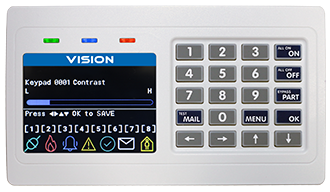 CP746WH/CP747WH/CP748 Horizontal 3.5" Keypad
 - CP143WH - 5" Colour Touch Keypad with Wi-Fi and Smart Card - Vertical orientation
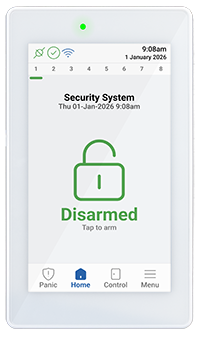 CP143WH Vertical 5" Colour Touch Keypad
